
It doesn’t matter where you are in your brand’s eCommerce journey, the gathering and surfacing of customer reviews needs to be at the top of your to-do list.
How you do it, though, is a bigger question.
The customer reviews dilemma
The biggest challenge is marrying the two things that will make customer reviews work for you. Do you make them independent, which is what your customers will prefer, or do you include them in your site architecture, giving you full control over which reviews are shown?
Using a dedicated review service can also come with its own set of issues, the largest of which is going to be cost. More well-known platforms offer enhanced services that can be helpful in building your calalogue of reviews, but the price can be significant, and the more reliant you become on these services, the harder it will be to leave if you need to cut costs.
Getting started with client reviews
If you’re not currently gathering reviews, this probably all seems like a problem for a far-off day. So how do you start without breaking the bank? Let’s look at a couple of options that can get you started for free.
A word of warning
Moving between review platforms is very difficult once you’ve started gathering reviews. The only harm in using several free platforms at once is that unless you’re a very busy company, you’ll struggle to create a decently sized review base, but that does mean it’s better to aim your efforts in one direction if you can.
Google Reviews
Somehow, the most universally available reviews are often overlooked. If you’ve set up your business in Google Business (the easiest way to tell is if it appears on Google Maps), you’ll be able to start gathering reviews which will appear on your business listing every time someone searches for you on Google (which is probably almost every time someone searches for your business, full stop).
Try not to end up like this:

The benefits
Huge brand credibility
Completely impartial
Depending on your website, can probably be surfaced easily
The drawbacks
It can be very difficult to get fake reviews removed (although this is improving)
Very manual process to gather reviews
Google account required to leave a review, and not everyone has one (depending on your demographics)
How to implement Google reviews
Firstly, get your business set up on Google Business. You can do that here.
Once that’s done, if you search for your business on Google while logged into your account, you’ll see this menu:
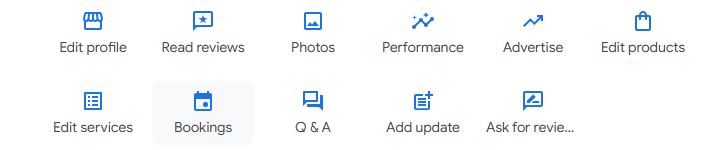
Click on the “Ask for reviews” button and it will give you a link you can send out to customers. That’s where the manual part comes in – other platforms can help you build and send the email, or even automate the process altogether. For a freebie, though, it’s tough to complain.
If you have a CRM system in place, you can use that to send the emails, but if you’re a smaller business, you can draft and send the emails as you would with any other. Provided people are signed in to Google, the link will pop open the review window, so they just need to give you a star rating, and hopefully some nice text to say how happy they are.
Judge Me
Every once in a while, there’s an exception to the rule which says “if it looks too good to be true, it probably is”, and Judge Me is happy to fill that niche when it comes to review platforms. It offers a free version that’s somehow got a decent selection of features, it integrates with sites including Shopify and WordPress, and if you need to scale up the cost is a very reasonable $15 a month, which is around £12 at today’s exchange rate.
The free features include automatic review reminders, which crosses off the issues with using Google Reviews. Upgrading add further features and support for a ton of integrations.
If you’re a new reviews collector, this is pretty hard to beat. Those who already have some reviews they wish to port over are going to find it’s hard to do so, but that is unfortunately a fairly universal issue.
The most important thing to consider here is that Judge Me have lots of positive reviews from their own customers, which both proves their value and the point of this article.
Implementing your own reviews
OK, so we’ve looked at a couple of third party review options. What if you really want to have full control?
This is where it gets a bit awkward. If your website/theme supports user accounts, it’s likely that there’s an option to feature at least product reviews on your pages, or you could ask a developer to build the feature for you if you don’t have it. However, you’ll miss out on those extra features built into the dedicated platforms.
You’ll also have to decide the point at which to intervene, which could look bad if you get it wrong. Research shows that consumers look for a score around 4.5 out of 5, not trusting a score that’s entirely made up of 5’s. It also says that a good response to a bad review can mitigate the effects, while showing that brands are engaging with their customers in a positive way. That’s got to be more of an opportunity than a detriment.
If you’ve got a Shopify site and you’re not currently building a review base, get in touch, and we can help set that up. Why miss out on potential sales when building trust signals can done for free?
Managing your own website, whether it’s eCommerce or not, is a tough job. If you’re doing it on a tight budget, and that probably describes most of the website-owning population in 2024, it’s even tougher. Successful websites thrive on continuous improvement, and that’s only possible if you have the data you need to make decisions.
Luckily there are still some free options to help you start building that data picture, and in this article we’ll look at ten of the best, plus a bonus one that’s very nearly free. We don’t have ties to any of these products, but if they want to send over free t-shirts as a result of this article, it’s a size medium please.
- Google Analytics
- Search Console
- Pagespeed Insights
- Answer the Public
- SEMRush
- AHRefs
- Google Trends
- Looker Studio
- Hubspot
- Hotjar
*Almost free – Keywords Everywhere ($27 a year)*
Google Analytics
The equivalent of a National Insurance number – everybody with a website needs this. Like most free tools there’s a steep learning curve which became a bit more like an unclimbable wall with the release of Google Analytics 4, but there are lots of guides out there which can help you get to grips on what it’s telling you, including free courses from Google itself. We can also help you to set it up and understand the data it’s reporting, if you prefer the human touch.
There are customisable goals (now called Key Events) which you can implement to report on the parts of your site that really matter, like whether people are taking actions like submitting contact forms. You can then use this to assess whether your marketing activity is working.
Search Console
It’s easy to mistake Search Console, which is another Google tool, for an older-looking version of Google Analytics with less features, but it’s there to do an entirely different job. Actually, it’s there to do three entirely different jobs.
Search Console’s able to tell you the queries people used to find your website, which is actually telling you the keywords that your site performs best on. It can tell you whereabouts in the search results you are, which you can use to guide your site optimisation and other advertising. If you’re not performing well for a keyword you need to rank for, some of the other tools in this article can help you find out how to improve.
It can also tell you about the health of your site – are all the right pages in Google’s Search Index? (if you run an E-commerce site, you might not want every variation of a product to be in there, for example – just the main product page). It will also warn you if pages become unavailable, which can be helpful if you’ve got a site outage you don’t know about.
Lastly, it will offers basic reporting on the quality of your website experience. Google’s assessment of your site looks at not just the content, but the overall performance. You can get a more detailed picture from Pagespeed Insights, another tool we’ll discuss later, but for a quick assessment, Search Console is an option.
There are also a few smaller services that are easy to overlook. Most websites will hopefully never have to suffer the effects of a Google Manual Action (a penalty from Google for doing something they see as trying to cheat their systems), but if you do, it can be appealed from within Search Console.
There’s also a link section that looks at the backlinks coming into your site – want to know which are your top linked pages, and which sites link to you the most? You can find out here.
Pagespeed Insights
If you need to know technical information about the performance of your pages, this is where to find out. There are quite a few different metrics you’ll be judged by, including the speed of your site, how much the page layout shifts around when it’s loading, and how quickly it becomes interactive.
The downside is that while it gives recommendations, most of them can only be solved with the help of an agency that has experienced developers. The upside is that we are one of those agencies, so if your site isn’t at its best, we can help you fix it.
Answer the Public
Knowing which questions your website has to answer to rank well on Google can be huge in terms of performance. Answer the Public is a tool which has been through a few different iterations (and owners), but the basic functionality remains pretty much the same. You can put in your search term and it will find you related searches on the same subject, including the questions users are asking. Creating content around the suggestions it gives will increase your authority on the subject, and your chances of the users you want landing on your site.
SEMRush
The paid version of SEMRush offers a wide selection of tools to help with SEO (Search Engine Optimisation), but there are still some you can use on the free plan to build up your site. There’s even limited keyword tracking, which means you find out how well your site is ranking for important search terms and see if it moves up or down the ranks with daily update emails.
AHRefs
Similar to SEMRush but taking a different approach to the free account is AHRefs, which will let you do limited analysis on sites which it validates through your Search Console account. Both SEMRush and AHRefs use their own proprietary metrics to calculate your site’s strength, so if you try both, prepare to see some variation in the reporting. AHRefs will send you some very useful tutorial videos, even if you are on the free plan, so may actually be the best one to try first.
Google Trends
Google Trends is similar to Answer the Public in that it will show you search trends and related searches, but the information it produces is a lot more limited. On the plus side, it’s fully free to use, so you can always use it as a fallback when you run out of free Answer the Public searches for the month.
Looker Studio
This one is filling more of a niche role. If you’ve got people you need to report to about your site’s progress, you can connect Google products like Analytics and Ads to Looker Studio and built stylish reports which can be filtered to show performance over custom periods. If you’ve got the patience, you can also add statistics from any other platform that will output them as a spreadsheet but setting up a Google Sheet to hold the data and adding it as a data source for your Looker Studio report.
Hubspot
If you’re just starting out then you might not have a solution set up to capture the data about the work that arrives via your website. The free version of Hubspot offers forms that can be embedded into your site, which can be set to email to the inbox of your choice. More importantly, you can keep the data inside Hubspot and use the free features to track the progress all the way from a lead to a customer. If the time comes when you realise you need more features, there’s also a competitively-priced Starter tier that will add a ton of functionality.
Hotjar
If you’re seeing lots of visitors but no enquiries, or just really want to know what your visitors do when they’re on the site, Hotjar is the answer to your problem. It can show you how far down your pages people scroll, where they like to click the most, and lots more. It’s also just been merged with two other firms that offer similar services, so now you get even more of an allowance with the free tier.
Keywords Everywhere
This tool used to have a free version, so I know how useful it can be. Unfortunately you now have to pay for even the lowest tier, but the price is $27 for an entire year. It’s a plugin for Google’s Chrome browser that offers some really helpful features. It works a bit like Answer the Public, but instead of a dedicated site, if you search for a topic on Google, you’ll also see related searches shown to the right of your search results. It can also assess website pages for keyword density, which is less useful now that AI is making a lot of the calls when ranking a web page, but there was a time when seeing that your biggest rival had mentioned “sandwich toasters” 35 times on their sandwich toaster page which was outranking yours was really helpful, because you could then mention it 37 times (once extra for insurance) and hope to outrank them.
What to do if the tools tell you to do complex work
Whether they’re free or paid, there’s only so far that website tools can get you. If you’re seeing results you can’t explain, or your site is failing to grow no matter what you do, we’re here to help. Give us a call or drop us a line and let’s chat about the options.
Do you know how well your eCommerce site ranks on Google? Ever wondered what your competition are doing to outrank you?
In this article I’ll look at why you should improve your organic search performance, and some tricks that can help you do it.
Why worry about organic search performance?
The truth is that for most sites, strong search performance and a high-quality user experience are the same thing. Your users want to land on a page that’s easy to use, well-written and helps them to do whatever they want to do. Google’s aim is to send them to the website best able to give them what they want. Your aim is to be the site that Google prefers to send those users to, so they can buy your product.
How Google assesses your website
This breaks down to four key points:
- Your site’s technical performance
- How your users behave
- Correct use of structure and high-quality backlinks
- Well-written content
How to look at your website’s technical performance (for free)
Getting insight into your website’s performance often comes at a premium, so the good news here is that Google offers a free way to check on technical SEO essentials like page loading speed and cumulative layout shifts (CLS). If you’ve ever noticed the text that’s in front of you being pushed down the page as a header image loads, that’s an example of CLS.
The bad news is that fixing the issues it flags usually requires having a good developer on tap. You probably know what’s coming next – we can help with that.
Here’s the link to the Google PageSpeed Insights tool: https://pagespeed.web.dev/
Finding out how your users use your website
There are multiple layers to this, and again, you can get some of the information you need for free, provided you have Google Analytics setup on your site. If you don’t already have it, put it at the top of your to-do list – it offers essential insight, and the only cost would be if you need a developer to implement it. Google offers lots of guidance on how to do it, although as it increases in complexity as a tool it has become a lot more technically demanding.
Google Analytics offers tons of information about how your users are behaving on your site, and can help you understand how long they stay on your site, and how many pages they look at while they’re there. It also offers some basic tracking of scroll depth, which is how far they move down the page – if they never get past the bit they land on, don’t visit other pages and leave immediately, that’s all going to be used against your site when Google decides how it should rank.
How should you structure a webpage?
While there’s not a precise format to building a good web page, there are definitely some best practices to follow. Some of them might not seem linked to SEO, but it’s really all self-supporting – do a great job of selling your page and you’ll get more visitors as a result, which then improves the page’s rank.
Firstly, use the Meta Description to sell your page. The Meta Description is the little precis that appears next to your page name in Google Search, like this:
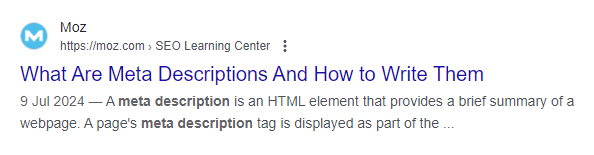
All websites will allow you to write your own for your pages, although the method will be different for each.
Next, make use of the different header options. Most sites will offer Headers 1-5 as standard (usually referred to as H#, e.g. H1), some may have more. These offer two benefits. They tell Google’s search robots how important the different headlines are when deciding to rank your page. H1 means it’s the most important header on the page, and all other headers should be considered as less important, but still more important than the copy that makes up the rest of the page.
You don’t have to use all of them, and the ones you don’t use don’t have to be in order – just remember that the highest number will be the most important.
They also act as a visual cue for your visitors – the biggest headline is the most important, but you’re drawing attention to all the important topics in your article.
Why do you need backlinks?
The rule for backlinks is that higher profile (reputable) sites have better quality links – the fact that they’ve linked to you is seen as a kind of endorsement by Google, and as a result you get improved ranking for your own pages. This works in reverse, too – lots of links from low-quality sites will make your site’s performance worse.
For most sites, it’s a balancing act. There are steps you can take to stop the bad links from being counted, but building your collection of good links can be a challenge. Have a think about any connections you might have that can help, which might be clients, industry connections or accrediting bodies.
The secret to well-written content
This one is much tougher to quantify, but sits across all the other factors. A well-written site will be more appealing to customers and Google’s search robots. It also increases your chances of taking one of the search features that will give your organic search performance a boost by featuring some of your content at the top of the page.
Copywriting is definitely more art than science, so if it’s not your forte then it might be worth looking at outsourcing it. There are also tools that will help with the basics, like Grammarly – it won’t write the copy for you, but it will help make it more readable.
The weapon of last resort here is of course GPT. Catapulting from being virtually unheard of to being the subject of at least 50% of the articles in my news feed at any one time, used the right way, GPT can be incredibly helpful with content creation. The vital thing is to remember that it’s only part of the puzzle – it’s not taken long for people to recognise the distinctive style of content written by GPT, so it should only be part of the process. Use it for research and content ideas, but not to produce anything that’s used without serious finessing from you or your team.
Ask for help if you need it
It’s easy to fall into the trap of trying to do everything yourself, but the fact is, agencies like ours exist because this work is difficult, technically finicky and really intensive. If you’re hitting brick walls everywhere you turn, give us a ring or drop us an email. We can quote for any or all of the work you’re struggling with, and in the long term finding a quicker resolution could well end up saving you money.
If your website isn’t delivering the results you were hoping for or expecting, it’s probably time to look at your search optimisation, sometimes also called your organic search performance (so called because it happens “naturally”, as opposed to paid search results that have a direct cost). In this Blog, we’ll look at what search engine optimisation is, what it does, and the foundational approaches to carrying it out.
What is Search Engine Optimisation (SEO)?
To really understand what SEO is, it’s helpful to know a little bit about how search engines worked before Google, and how they (Google) work now.
Back in the old days, when dinosaurs roamed the web, search engines were dumb. They didn’t know anything about you other than the words you were typing into your search bar, and they used a basic matching system to deliver you search results linked to the words. If you looked for “computer mouse”, you’d get some results about computer mice, some results about mice that eat cheese, and some results about computers but no mention of mice. You could find what you wanted with a bit of work, but the internet was a smaller place generally so there wasn’t a ton of results to wade through for most topics, and it was possible to get your page to the top of a search engine results page (SERP) using tactics as ingenious as including the word you were targeting as many times as possible in the page.
That all changed when Google came along. Google’s search results are affected by so many different factors that it’s not practical to list them all here, but here is a very rough explanation using some of the factors:
- Google’s search robots (bots) analyse (or crawl) every single page on the internet that they can reach
- The data collected by Google’s bots is used to assign every website a “quality” score based on Google’s own criteria
- The technical standard of each website is assessed, including how long a page takes to load
- The bots will also attempt to understand what the page is about in order to decide where it should appear in your search results
- Google hold data on everyone who has a Google account (in 2023 there were 1.8 billion users of Gmail, Google’s email software, worldwide)
- By combining their data on the page and their data on you and your behaviour, Google will then show you the search result it thinks best matches what you were looking for
As I say, this isn’t an exact explanation, but if we apply it to the same search as above, you can see the difference in the results.
If you look for “computer mouse”, Google knows that kind of mouse isn’t related to the animal, because it understands how the words work together to create context. It also knows that when you search for those words you’re looking for the answer to a question, and it wants to guess what your question is and answer you in the most efficient way it can. Your search might include a map which shows the nearest places to your location that sells computer mice, especially if you’re using your mobile phone to search. You might be preferentially served results for a site that sells computer equipment that Google knows you’ve previously visited. You’ll almost certainly get results that are adverts for places near you or online that sell computer equipment. Those are a topic for another day – we’re looking for the results that appear below those, which could include local search results, and features that highlight content from particular sites which answer the question Google thinks you’re asking.
And that’s where SEO comes in. It’s the art of structuring your website, including everything that’s written on it, to have Google understand what it is you do and how you can help its users, so that it can then recommend you to them ahead of your competitors.
How do we know what Google is looking for when ranking a webpage?
Because Google has done such a good job of keeping the algorithm that powers their search a secret, traditionally SEO has been based on observations of the way that pages perform.
That all changed earlier this year, when for the first time, Google’s internal documents were leaked that discussed some of the criteria that decide on the order of their search results.
That’s how we know that every site is given a quality score by Google, which was always suspected by industry experts, but never confirmed. We also know some of the other things that Google’s bots prefer to find when crawling a page.
Google’s stated preference for a site is that it demonstrates the qualities Experience, Expertise, Authoritativeness and Trustworthiness (Which they call E-E-A-T).
Experience means they want you to show that you’ve already done the thing you’re telling people you can do. Expertise is showing that you can do it well, and have good subject knowledge. Authoritativeness would ideally be demonstrated by having good quality links to your site from other sites in the same industry, or high-profile news sites like the BBC or The Guardian. Trustworthiness would look for reviews from Google itself, a third-party review site like Trustpilot, or hosted on your own site. On a more fundamental level, this one also wants your site to have secure hosting that protects the data of your customers.
So, what should you aim for?
- Informative, well-written content. This covers every single letter in the acronym, as it demonstrates why your goods or services are better than the competition (EE), the better your content the more sites will want to link to it (A), and if you’re hosting your own reviews from customers, you’ll want to work with them to make sure that they’re compelling (T).
- Content that’s been structured in a way that makes it easy for both people and Google’s search bots to read and understand it. Luckily, these two aims aren’t mutually exclusive.
- High-quality backlinks. Not much more to add here beyond what’s discussed above, but we’ll discuss the impact of low-quality backlinks later.
Creating quality content
One of the toughest parts of working on search optimisation is that it needs a combination of analytic and creative skills to address poor performance. It’s really easy to say that the solution is quality content, but what that looks like and how you produce it will be unique to everyone. To make it slightly easier, you can use the PARTY acronym:
Plan – Plan your content, not just by laying out the structure of your article, but by using tools like Answerthepublic, Google Trends, and the search suggestions in the Google search bar to look at what people are searching for, so you can answer their questions as part of your writing. It’s also helpful to produce a content plan which covers a longer period. This can be especially useful if you’re able to share the writing responsibilities, as it makes sure you’re all aiming at the same target.
Apply – One of the least sexy bits of search optimisation, and it’s not the sexiest job at the best of times, is the application of the fundamental aspects of optimisation. It’s discussed more below.
Research – As both a user and a search bot, there’s no worse kind of page to land on than one that’s thin on content. If you’re doing some writing and it’s not one of your specialist subjects, you need to do enough research to be informative, and if possible, find something new to add to the conversation.
Tell – Both the public and Google love a lived experience. If you’ve got personal anecdotes which relate to your topic, find a way to work them in there. If you have a house style for writing that doesn’t require you to be formal (which most retail businesses are unlikely to), adding some personality is a great way to make a connection with your reader.
Yield – Maybe this one should have been first, but no one is going to remember an acronym that spells out Ypart. What’s your article intended to do for your site? Do you want to promote a range of products, or demonstrate expertise in a particular area? This gives you the topic for the article, and that lets you know what to aim for with everything else you do.
Using the proper structure
This should go hand-in-hand with creating quality content, so much so that I’ve included it in the PARTY acronym. The key elements are:
Page title – the first thing people and bots see, and the keystone your search is built on. It can often be a good idea to make this a question that you answer in the article, to fit with the questions users are trying to answer via Google.
Headers – structure your paragraphs with compelling headers. Don’t be afraid to use questions here too, if they’re relevant to the topic. Headers use a simple bit of code (H1, H2, H3, etc) to tell Google the order of importance attached to your article headings. It also makes them larger than standard text (paragraph), which is important for your customers too.
Meta description – the precis that Google shows of your page’s topic. This is often a missed opportunity, don’t waste the chance to write something that makes your potential visitors want to learn more. Make the best use of the character limit (although the Google leak has shown that this isn’t all that important, it’s still good practice for the users who’ll be reading just the part that fits).
Build your backlinks
Strengthening your site’s search optimisation can sometimes be a case of who you know, rather than what you know, but with a bit of ingenuity you can create connections that will increase your search ranking and hopefully bring in a few more visitors directly.
High profile sites (news sites like the BBC, expert sites in your field of work, and some educational sites all have good quality authority that will flow through links into your site. Have a think about any connections you might have that could be interested in linking to you. If you don’t have any, that’s fine too, but it might take a bit more legwork to get a decent amount of links sorted out. If you’ve got something newsworthy, you should always include a link to your site from any press release you send out. It often won’t make it to the final draft, but if it does you’ll be getting even more use out of the story.
A quick word on toxic backlinks
So called “toxic” backlinks are ones that have the opposite effect on your site’s ranking. They might be from an attempt to boost a site’s profile in the early days of Google, when the number of links was more important than the quality, or they could have accumulated for an unknown reason. Whichever it is, there is a process to disavow the link via a Google tool if you aren’t in a position to have it removed from the other site (and many will not respond to contact emails), which can go a little way towards alleviating the problem.
Conclusion
This has been a very high-level look at the basics of Search Engine Optimisation. It can be intimidating to tackle without the right tools to measure success and suggest improvements, which is why we’re always ready to help if you need us. We’ve helped companies from a wide variety of industries to improve their site’s visibility, and would love to help you do the same.
When it comes to launching an eCommerce website, choosing the right platform is crucial for the success of your online business. With numerous options available, one platform that often stands out is Shopify. Known for its user-friendly interface, robust features, and scalability, Shopify has become a popular choice for entrepreneurs and businesses looking to establish an online presence. However, like any other platform, Shopify has its own set of pros and cons that should be carefully considered before making a decision. In this blog post, we’ll explore the advantages and disadvantages of building a Shopify website compared to other e-commerce platforms.
Pros of Building a Shopify Website:
1. User-Friendly Interface: One of the biggest advantages of Shopify is its user-friendly interface. With intuitive tools and a drag-and-drop editor, Shopify makes it easy for users to build and customise their online stores without any technical expertise.
2. Robust Features: Shopify offers a wide range of built-in features and functionalities, including inventory management, order processing, payment gateways, and marketing tools. Additionally, Shopify’s App Store provides access to thousands of third-party apps and integrations to further enhance the functionality of your store.
3. Scalability: Whether you’re a small startup or a large enterprise, Shopify can scale with your business. With flexible pricing plans and the ability to handle high traffic volumes, Shopify allows businesses to grow and expand their online operations without worrying about technical limitations.
4. Mobile Responsiveness: In today’s mobile-centric world, having a mobile-responsive website is essential for success. Shopify websites are optimised for mobile devices, ensuring a seamless shopping experience for customers across desktop, tablet, and smartphone devices.
5. Security and Reliability: Shopify prioritises security and reliability, offering robust security features, SSL encryption, and PCI compliance to protect customer data and transactions. With 99.99% uptime and automatic backups, Shopify provides peace of mind to merchants and ensures uninterrupted operation of their online stores.
Cons of Building a Shopify Website:
1. Transaction Fees: While Shopify offers a range of pricing plans, merchants will incur transaction fees for each sale made through the platform, in addition to credit card processing fees. These fees can add up, especially for businesses with high sales volumes, impacting overall profitability. If you are a growing business and can plan ahead, work out what the potential costs might be over time.
2. Limited Customisation: While Shopify allows for customisation through themes and apps, some merchants may find the platform limiting in terms of design flexibility and customisation options compared to other e-commerce platforms. Advanced customisation may require coding knowledge or hiring a good agency, ideally who is a partner, adding to the cost and complexity.
3. Dependency on Third-Party Apps: While Shopify’s App Store offers a vast selection of third-party apps and integrations, relying too heavily on apps can lead to dependencies and potential issues with compatibility, performance, data management and security. Merchants should carefully vet and manage the apps used on their Shopify stores to ensure optimal performance and security. In addition apps may go unsupported by the 3rd party which may be a risk.
4. Subscription Costs: While Shopify offers a range of pricing plans to accommodate different business needs, the subscription costs can add up over time, especially as your business grows and requires additional features or resources. Merchants should carefully consider their budget and long-term goals when choosing a Shopify plan.
5. SEO Limitations: While Shopify provides basic SEO features and tools, some merchants may find the platform limiting in terms of advanced SEO capabilities compared to other e-commerce platforms. Optimising product pages, meta tags, and URLs for search engines may require additional effort and customisation, hire a good professional to help if you can’t do this yourself.
Building a Shopify website offers numerous advantages, including a user-friendly interface, robust feature set, scalability, and security. However, merchants should also consider the potential drawbacks, such as transaction fees, limited customisation, dependency on third-party apps, subscription costs, and SEO limitations, before committing to the platform. Ultimately, the decision to choose Shopify or another e-commerce platform should be based on your specific business needs, budget, technical requirements, and long-term goals.
Ready to launch your eCommerce website? Sometimes deciphering which is the best business fit for you can be challenging, we’re happy to help you find the best fit for your business.