
On 12 December last year, Google started the rollout of its latest Core algorithm update, which finished on 18 December and was immediately followed by an update to Google’s Spam detection algorithm on 19 December. The core algorithm update caused noticeable shifts in rankings across various industries, but many website owners are reporting seismic changes from the spam update.
What Are Google Core Algorithm Updates?
Google’s core algorithm updates are broad changes designed to improve the relevance and quality of search results. Unlike specific updates targeting particular issues—like the Helpful Content Update or the Spam Update—core updates refine how Google assesses and ranks content overall. These changes can influence visibility in search results significantly, as it essentially moves the goalposts for judging successful content. Sometimes they move more than others, which is why it’s entirely possible that your site may have been through previous updates without being affected.
Who has been negatively affected by the December 2024 algorithm update?
Reports from the Core update indicate these kinds of site have been affected:
- E-commerce Websites: Some online retailers have reported a decline in search visibility. This may reflect Google’s increased focus on distinguishing high-quality, authoritative product pages from thin or repetitive content. Sites with poorly optimized product descriptions or lacking user reviews may be particularly vulnerable.
- Informational Websites: Informational content publishers, especially smaller niche sites, have faced challenges. Larger generalist platforms with diverse, authoritative content have seen gains at their expense. This shift suggests Google is prioritizing sites that offer comprehensive, multi-faceted coverage over narrowly focused expertise.
- Affiliate and Ad-Heavy Sites: Websites relying heavily on affiliate links or ads without providing unique value to users appear to have been negatively impacted. Google’s guidelines emphasize content that serves user needs rather than solely commercial interests.
For the Spam update, we know that it was a general update rather than being aimed at a particular kind of spam, but we don’t know if the criteria have changed. There’s been no change to Google’s list of the kind of content and behaviour to avoid, but many affected sites are adamant that they aren’t using spam-adjacent tactics, which would at least have gone some way to explain things for the sites where traffic has almost completely disappeared post-update.
Why does Google update their Core algorithm?
As with all tech, changes outside the Google ecosystem will mean there is searchable content which they need updates to correctly interpret. As a very top-level overview, they will be looking for:
- Quality Over Quantity: Thin or duplicate content has become a target, with Google rewarding sites that offer depth and originality.
- Authority and Expertise: Sites demonstrating experience, expertise, authoritativeness, and trustworthiness (E-E-A-T, Google’s own recipe for search success) continue to perform better.
- User Experience: Pages with excessive ads, poor mobile usability, or slow load times may face penalties.
Google’s Spam criteria
If you want to read Google’s full policies you can click here. If you’d rather read my interpretation, which is admittedly much shorter, here it is:
- Cloaking – showing a different page to search engines than the one seen by website visitors
- Doorway abuse – pages that just exist to send people to other pages on the website
- Expired domain abuse – buying the expired address for a legitimate website to send people to a junk sales site
- Hacked content – having pages on your site that have been hacked and not repaired
- Hidden links and link abuse – hiding links on a page that are just there to affect search results
- Keyword stuffing – too many of the same keywords in your site content
- Link spam – buying links from an online service. These are usually spammy sites so easy for Google to recognise.
- Machine generated traffic – traffic from bots, which are programs created to pretend to be people
- Malware – linking to malware downloads
- Misleading functionality – telling people you’ve got a feature, but the feature doesn’t work
- Scaled content abuse – adding loads of pages which have AI-generated content and don’t actually help your users
- Scraping – copying content from elsewhere
- Sneaky redirects – using something called a redirect to send people from Page A to Page B automatically
- Site reputation abuse – pretending to be someone else
- Thin affiliation – publishing content from a shop site so it looks like you are the shop owner
- User-generated spam – having rubbish in reviews or forum comments, (you’ll often see this promoting pharmaceuticals)
Can your website recover from an algorithm update?
Yes, but it might take some hard work and an undefined amount of time. Sometimes a subsequent update will undo the damage, but generally speaking if you’ve come a cropper, there’s something about the site you could be doing better, and that means identifying it, actioning improvements, and continuing to build back using the age-old technique of creating high-quality, relevant content.
Our guide to Search Engine Optimisation basics will get you started, but we’re also here to help in a hands-on way – there’s definitely correlation between maintaining, or even improving your search rankings, and having a well-optimised site. Drop us a line if you want to discuss the options.
For years now, the future of marketing has been seen as video content. Generally speaking, it connects differently with audiences than text content, because it’s quicker to digest and a more engaging medium. It’s also versatile, because a longer video can be recycled into ads for use on social media.
The downside to that is the perceived difficulty and expense of generating video content.
How can I make video content on a budget?
First, let’s not get carried away with all this video freedom. Good video content takes planning, and if we skip that phase the end result is going to be messy.
Set out the objective of the video you want to make, and the details of how you’re going to achieve that. Do you want to sell a product, are you trying to pass on some knowledge about your company, or is it something else? These questions will help you plan it out:
- Is that the right format for the job?
- What are we making a video to achieve?
- Does it need to feature real people or a voiceover, or can it be done with text?
- Does it need any graphic design work done ahead of time?
- How long does it need to be?
Generally speaking, I divide my video content into three categories:
- Video that doesn’t need a human involved
- Video that needs part of a human involved (usually their voice)
- Video that needs to be all people in the middle, with an intro and outro to make it look professional
Category one needs me to plan out the story of the video, but the information will be conveyed with short bits of text and using images so it doesn’t need as much prep as categories two and three.
If there’s a human being involved, though, it’s important to write a script out before you start. This will keep your message on target, and also keep you from ending up with lots of footage that you need to edit.
Recording footage on a budget
Part 1 – recording people
If your video needs a real person, this section is for you. If it doesn’t, you can skip to the next section.
Your secret weapon here is that in 2025 we all carry superb quality cameras around with us every day. The key to making the footage they record look professional is in the background, and the lighting.
All smartphones have a camera, and most are capable of 4k video – this is what you’ll need if you’re recording just one person doing a piece to camera.
If you’re recording an interview, or you want to feature multiple people, a video call might be a better option. Zoom has a feature which will now record video and audio at each end of the call, which can then be combined into a stutter-free video which you can edit in one of the tools below. Microsoft Teams is also capable of recording calls, although maybe without quite such a smooth result, it’s still pretty good.
If you’re recording a video call, encourage your presenters to wear headsets, or worst case scenario, modern headphones that offer hands-free will do. That’ll cut down on any background noise. Ask them to present in front of a tidy background – it doesn’t need to be a liminal space drifting through a white void, but it shouldn’t look like the inside of a skip, either. Video backgrounds have come on a way but still look a bit too fake to use unless there’s an emergency.
If you’re just recording a voiceover, there are a few ways to do it. Windows has Sound Recorder, which is ancient but still does the job. If you need to edit the file, Audacity is a free bit of software that will let you chop it up and rearrange it, then output as an audio file ready to use.
Editing Teams/Zoom footage
This is where the time spent planning out the script is important. With the software you’ll be using, you can make some edits, but you won’t want to have lots to make – it’s fiddly and time-consuming. If you’re going to need to make lots of edits, I would recommend you get a copy of Power Director, which is easy to use and comes in either subscription or one-off cost form. In the long-run that will save you time and money later vs trying to edit using an unsuitable platform, so it’s worth the small investment.
Part 2 – Adding the professional touch
OK, so if you need it you should now have your audio and/or footage of people ready to go. To create your video, you’ll need one of these:
Dedicated video tools:
- Lumen5
- Biteable
- InVideo
Tools that work with video, but not as their specialism:
- Adobe Express
- Canva
All these platforms have a drag and drop video editor that lets you place either your own clips or the stock footage which the platforms contain anywhere you want in the video timeline.
You can add multiple layers, allowing you to have text appear over the video, and also to create intro and outro sections using your branding. You can also apply animation effects to the text or other elements, which can let you put together some slick intros, outros and transitions. Speaking of transitions, you can also change the way that the video moves from clip to clip – sadly, starwipe isn’t an option any of these platforms offer.
They also have a bank of royalty-free music which can be used to score your creations. Some have a dedicated feature to let you add a voiceover, but if not you can always add it in as a music track.
Of all the platforms above, Biteable is the only one to offer not just stock footage but also reusable animated sections. These can be more helpful than stock when you need to present information, although you can still put decent videos together with anything on the list above – it just takes a bit more ingenuity.
Pro tips for new video editors
Don’t have lots of dialogue if there’s text to read on the screen, and vice versa – your audience won’t be able to concentrate on both.
If there is text on screen, check the timings with someone else before processing your video. Because you know what the text says, it’s easy to underestimate how long it will take someone to read for the first time. Equally, you don’t want the text on screen for so long that your viewers get bored.
Don’t get too carried away with transitions – keep it simple, like a slide or a fade, instead of adding more visual distractions.
The information above is all you need to get started, but if you need more help, there are lots of dedicated guides on YouTube – now get out there, and start putting your own video content together!
Note for anyone that buys PowerDirector
So, the irony here is that PowerDirector is more capable of editing than any of the platforms discussed above, so while you can use the method I’ve suggested, you may find it easier to compile the clips you want from a platform, then export them and cut the whole thing together in PowerDirector. It might be worth trying both ways so you can find the one that works best for you.
If the current understanding of how Google ranks websites is right, every site is like a leaky bucket.
It holds your website authority, but when you link to other sites, each link creates a hole through which a little bit of your site authority leaks into their bucket, and so on. Your bucket is simultaneously filling with authority from other sites, but what can you do if, to take this tortured analogy all the way, the water is polluted?
What are toxic backlinks?
We know from this year’s Google algorithm leak that they assign every site a score based on aggregate factors including technical health, user behaviour and backlink quality. While this was pretty much the way the industry had assumed it worked for years, the confirmation was still nice.
A link from a well-maintained and updated site would be a positive, endorsing your site’s status as an authoritative destination for information about whatever it is you do. On the flipside of this, what if you’ve got links from sites that aren’t being maintained? Maybe they don’t have a security certificate (giving them the https address, a must for Google), or even worse, they might be previously legitimate websites that have since been hacked.
They don’t represent a positive trust factor for your site, in fact it’s the opposite. You might also have no idea they’re there, unless you invest in a dedicated tool like AHRefs or SEMRush.
Why do toxic backlinks happen?
This is where we don’t have all the answers, or at least not entirely. There are old sites, and there are sites that linked to you before they were hacked, but there are also sites that get hacked and then add a link to your completely above board business.
There are a few suggested reasons for this, but in the end we can only speculate. This morning I checked on the website of a client and found that they have three new toxic backlinks from different sites, all three of which share the exact same text in the link and on the page itself – at least from what I could tell, because all three sites flagged as dangerous to Google, which refused to let me visit them.
The fact that the content is duplicated means this is most likely being done by bots, not humans. They might be building the quality profile of a site which criminals want to prove is genuine so they can use it to commit ad fraud, or they might be bad actors working for an enemy state which is trying to do something more insidious.
Scary stuff. But can you fix it?
How to get rid of toxic backlinks
You’ve invested in an SEO tool, and found you’ve got a ton of links that you don’t want that are probably bringing your site authority down. You know what their URLs are and can see the meta description for each page via your SEO tool, which will give you an idea of whether it’s legit or not. You’ve now got two options.
- You can contact the site owner and ask them to remove the link. This bit of advice is still being given out so I’m mostly including it for completeness, and so we can have a bit of a laugh about how you do that when your antivirus software won’t let you visit the site.
- Hopefully you’ve followed the advice in our previous article and set up Google Search Console. If you haven’t, you’ll need to do that first, then come back.
Right, done? Now you can use Google’s Disavow tool, which is here: https://search.google.com/search-console/disavow-links
How the Disavow tool works
You’ll need a plain text file which lists all the backlinks you want to disavow (basically, telling Google not to count the link to you when it’s assessing your site). Most of the SEO tools will do this for you, and SEMRush has a particularly helpful setup. You just upload the list via the link above, and hey presto! Google will, sooner or later, accept the list and apply it when indexing your site. The time quoted on submission is quite long, I’ve found it is usually much quicker.
Does removing toxic backlinks have an effect?
Toxic backlink theory has taken a bit of a hit because Google experts have repeatedly said that they don’t affect your site, but it’s good to remember that they are the same experts who said Google doesn’t apply an aggregate quality score to your site.
We’ve had success for a luxury menswear client who had picked up a slew of bad backlinks following a site migration. Prior to submitting an updated disavow list for them, some of their major keywords were fluctuating in position, but we’ve seen that settle down, allowing us to focus on achieving organic growth.
We can’t be certain of the impact, because in Search Optimisation we never can, but in legal terms, the balance of probabilities says it had a positive effect.
Backlink disavowal basics
The most important thing is to be sure about the sites you’re disavowing. Look at the clues:
- Does the meta description consist of random words?
- Does it seem like the site should be linking to you?
- Is the site domain from a country that you have no link with, or are suspicious of?
Basically, if you sell luxury lamps in Luton, would you expect to have a link from the website of an Australian plumber?
If the answer is “no”, then disavow that link. If the answer is “yes”, drop me a line, because that sounds like a story worth hearing.
Do you know how well your eCommerce site ranks on Google? Ever wondered what your competition are doing to outrank you?
In this article I’ll look at why you should improve your organic search performance, and some tricks that can help you do it.
Why worry about organic search performance?
The truth is that for most sites, strong search performance and a high-quality user experience are the same thing. Your users want to land on a page that’s easy to use, well-written and helps them to do whatever they want to do. Google’s aim is to send them to the website best able to give them what they want. Your aim is to be the site that Google prefers to send those users to, so they can buy your product.
How Google assesses your website
This breaks down to four key points:
- Your site’s technical performance
- How your users behave
- Correct use of structure and high-quality backlinks
- Well-written content
How to look at your website’s technical performance (for free)
Getting insight into your website’s performance often comes at a premium, so the good news here is that Google offers a free way to check on technical SEO essentials like page loading speed and cumulative layout shifts (CLS). If you’ve ever noticed the text that’s in front of you being pushed down the page as a header image loads, that’s an example of CLS.
The bad news is that fixing the issues it flags usually requires having a good developer on tap. You probably know what’s coming next – we can help with that.
Here’s the link to the Google PageSpeed Insights tool: https://pagespeed.web.dev/
Finding out how your users use your website
There are multiple layers to this, and again, you can get some of the information you need for free, provided you have Google Analytics setup on your site. If you don’t already have it, put it at the top of your to-do list – it offers essential insight, and the only cost would be if you need a developer to implement it. Google offers lots of guidance on how to do it, although as it increases in complexity as a tool it has become a lot more technically demanding.
Google Analytics offers tons of information about how your users are behaving on your site, and can help you understand how long they stay on your site, and how many pages they look at while they’re there. It also offers some basic tracking of scroll depth, which is how far they move down the page – if they never get past the bit they land on, don’t visit other pages and leave immediately, that’s all going to be used against your site when Google decides how it should rank.
How should you structure a webpage?
While there’s not a precise format to building a good web page, there are definitely some best practices to follow. Some of them might not seem linked to SEO, but it’s really all self-supporting – do a great job of selling your page and you’ll get more visitors as a result, which then improves the page’s rank.
Firstly, use the Meta Description to sell your page. The Meta Description is the little precis that appears next to your page name in Google Search, like this:
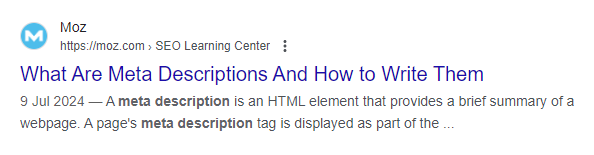
All websites will allow you to write your own for your pages, although the method will be different for each.
Next, make use of the different header options. Most sites will offer Headers 1-5 as standard (usually referred to as H#, e.g. H1), some may have more. These offer two benefits. They tell Google’s search robots how important the different headlines are when deciding to rank your page. H1 means it’s the most important header on the page, and all other headers should be considered as less important, but still more important than the copy that makes up the rest of the page.
You don’t have to use all of them, and the ones you don’t use don’t have to be in order – just remember that the highest number will be the most important.
They also act as a visual cue for your visitors – the biggest headline is the most important, but you’re drawing attention to all the important topics in your article.
Why do you need backlinks?
The rule for backlinks is that higher profile (reputable) sites have better quality links – the fact that they’ve linked to you is seen as a kind of endorsement by Google, and as a result you get improved ranking for your own pages. This works in reverse, too – lots of links from low-quality sites will make your site’s performance worse.
For most sites, it’s a balancing act. There are steps you can take to stop the bad links from being counted, but building your collection of good links can be a challenge. Have a think about any connections you might have that can help, which might be clients, industry connections or accrediting bodies.
The secret to well-written content
This one is much tougher to quantify, but sits across all the other factors. A well-written site will be more appealing to customers and Google’s search robots. It also increases your chances of taking one of the search features that will give your organic search performance a boost by featuring some of your content at the top of the page.
Copywriting is definitely more art than science, so if it’s not your forte then it might be worth looking at outsourcing it. There are also tools that will help with the basics, like Grammarly – it won’t write the copy for you, but it will help make it more readable.
The weapon of last resort here is of course GPT. Catapulting from being virtually unheard of to being the subject of at least 50% of the articles in my news feed at any one time, used the right way, GPT can be incredibly helpful with content creation. The vital thing is to remember that it’s only part of the puzzle – it’s not taken long for people to recognise the distinctive style of content written by GPT, so it should only be part of the process. Use it for research and content ideas, but not to produce anything that’s used without serious finessing from you or your team.
Ask for help if you need it
It’s easy to fall into the trap of trying to do everything yourself, but the fact is, agencies like ours exist because this work is difficult, technically finicky and really intensive. If you’re hitting brick walls everywhere you turn, give us a ring or drop us an email. We can quote for any or all of the work you’re struggling with, and in the long term finding a quicker resolution could well end up saving you money.
It doesn’t matter where you are in your brand’s eCommerce journey, the gathering and surfacing of customer reviews needs to be at the top of your to-do list.
How you do it, though, is a bigger question.
The customer reviews dilemma
The biggest challenge is marrying the two things that will make customer reviews work for you. Do you make them independent, which is what your customers will prefer, or do you include them in your site architecture, giving you full control over which reviews are shown?
Using a dedicated review service can also come with its own set of issues, the largest of which is going to be cost. More well-known platforms offer enhanced services that can be helpful in building your calalogue of reviews, but the price can be significant, and the more reliant you become on these services, the harder it will be to leave if you need to cut costs.
Getting started with client reviews
If you’re not currently gathering reviews, this probably all seems like a problem for a far-off day. So how do you start without breaking the bank? Let’s look at a couple of options that can get you started for free.
A word of warning
Moving between review platforms is very difficult once you’ve started gathering reviews. The only harm in using several free platforms at once is that unless you’re a very busy company, you’ll struggle to create a decently sized review base, but that does mean it’s better to aim your efforts in one direction if you can.
Google Reviews
Somehow, the most universally available reviews are often overlooked. If you’ve set up your business in Google Business (the easiest way to tell is if it appears on Google Maps), you’ll be able to start gathering reviews which will appear on your business listing every time someone searches for you on Google (which is probably almost every time someone searches for your business, full stop).
Try not to end up like this:

The benefits
Huge brand credibility
Completely impartial
Depending on your website, can probably be surfaced easily
The drawbacks
It can be very difficult to get fake reviews removed (although this is improving)
Very manual process to gather reviews
Google account required to leave a review, and not everyone has one (depending on your demographics)
How to implement Google reviews
Firstly, get your business set up on Google Business. You can do that here.
Once that’s done, if you search for your business on Google while logged into your account, you’ll see this menu:
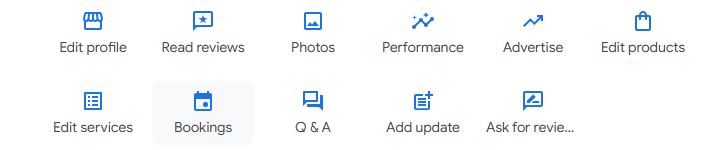
Click on the “Ask for reviews” button and it will give you a link you can send out to customers. That’s where the manual part comes in – other platforms can help you build and send the email, or even automate the process altogether. For a freebie, though, it’s tough to complain.
If you have a CRM system in place, you can use that to send the emails, but if you’re a smaller business, you can draft and send the emails as you would with any other. Provided people are signed in to Google, the link will pop open the review window, so they just need to give you a star rating, and hopefully some nice text to say how happy they are.
Judge Me
Every once in a while, there’s an exception to the rule which says “if it looks too good to be true, it probably is”, and Judge Me is happy to fill that niche when it comes to review platforms. It offers a free version that’s somehow got a decent selection of features, it integrates with sites including Shopify and WordPress, and if you need to scale up the cost is a very reasonable $15 a month, which is around £12 at today’s exchange rate.
The free features include automatic review reminders, which crosses off the issues with using Google Reviews. Upgrading add further features and support for a ton of integrations.
If you’re a new reviews collector, this is pretty hard to beat. Those who already have some reviews they wish to port over are going to find it’s hard to do so, but that is unfortunately a fairly universal issue.
The most important thing to consider here is that Judge Me have lots of positive reviews from their own customers, which both proves their value and the point of this article.
Implementing your own reviews
OK, so we’ve looked at a couple of third party review options. What if you really want to have full control?
This is where it gets a bit awkward. If your website/theme supports user accounts, it’s likely that there’s an option to feature at least product reviews on your pages, or you could ask a developer to build the feature for you if you don’t have it. However, you’ll miss out on those extra features built into the dedicated platforms.
You’ll also have to decide the point at which to intervene, which could look bad if you get it wrong. Research shows that consumers look for a score around 4.5 out of 5, not trusting a score that’s entirely made up of 5’s. It also says that a good response to a bad review can mitigate the effects, while showing that brands are engaging with their customers in a positive way. That’s got to be more of an opportunity than a detriment.
If you’ve got a Shopify site and you’re not currently building a review base, get in touch, and we can help set that up. Why miss out on potential sales when building trust signals can done for free?
Managing your own website, whether it’s eCommerce or not, is a tough job. If you’re doing it on a tight budget, and that probably describes most of the website-owning population in 2024, it’s even tougher. Successful websites thrive on continuous improvement, and that’s only possible if you have the data you need to make decisions.
Luckily there are still some free options to help you start building that data picture, and in this article we’ll look at ten of the best, plus a bonus one that’s very nearly free. We don’t have ties to any of these products, but if they want to send over free t-shirts as a result of this article, it’s a size medium please.
- Google Analytics
- Search Console
- Pagespeed Insights
- Answer the Public
- SEMRush
- AHRefs
- Google Trends
- Looker Studio
- Hubspot
- Hotjar
*Almost free – Keywords Everywhere ($27 a year)*
Google Analytics
The equivalent of a National Insurance number – everybody with a website needs this. Like most free tools there’s a steep learning curve which became a bit more like an unclimbable wall with the release of Google Analytics 4, but there are lots of guides out there which can help you get to grips on what it’s telling you, including free courses from Google itself. We can also help you to set it up and understand the data it’s reporting, if you prefer the human touch.
There are customisable goals (now called Key Events) which you can implement to report on the parts of your site that really matter, like whether people are taking actions like submitting contact forms. You can then use this to assess whether your marketing activity is working.
Search Console
It’s easy to mistake Search Console, which is another Google tool, for an older-looking version of Google Analytics with less features, but it’s there to do an entirely different job. Actually, it’s there to do three entirely different jobs.
Search Console’s able to tell you the queries people used to find your website, which is actually telling you the keywords that your site performs best on. It can tell you whereabouts in the search results you are, which you can use to guide your site optimisation and other advertising. If you’re not performing well for a keyword you need to rank for, some of the other tools in this article can help you find out how to improve.
It can also tell you about the health of your site – are all the right pages in Google’s Search Index? (if you run an E-commerce site, you might not want every variation of a product to be in there, for example – just the main product page). It will also warn you if pages become unavailable, which can be helpful if you’ve got a site outage you don’t know about.
Lastly, it will offers basic reporting on the quality of your website experience. Google’s assessment of your site looks at not just the content, but the overall performance. You can get a more detailed picture from Pagespeed Insights, another tool we’ll discuss later, but for a quick assessment, Search Console is an option.
There are also a few smaller services that are easy to overlook. Most websites will hopefully never have to suffer the effects of a Google Manual Action (a penalty from Google for doing something they see as trying to cheat their systems), but if you do, it can be appealed from within Search Console.
There’s also a link section that looks at the backlinks coming into your site – want to know which are your top linked pages, and which sites link to you the most? You can find out here.
Pagespeed Insights
If you need to know technical information about the performance of your pages, this is where to find out. There are quite a few different metrics you’ll be judged by, including the speed of your site, how much the page layout shifts around when it’s loading, and how quickly it becomes interactive.
The downside is that while it gives recommendations, most of them can only be solved with the help of an agency that has experienced developers. The upside is that we are one of those agencies, so if your site isn’t at its best, we can help you fix it.
Answer the Public
Knowing which questions your website has to answer to rank well on Google can be huge in terms of performance. Answer the Public is a tool which has been through a few different iterations (and owners), but the basic functionality remains pretty much the same. You can put in your search term and it will find you related searches on the same subject, including the questions users are asking. Creating content around the suggestions it gives will increase your authority on the subject, and your chances of the users you want landing on your site.
SEMRush
The paid version of SEMRush offers a wide selection of tools to help with SEO (Search Engine Optimisation), but there are still some you can use on the free plan to build up your site. There’s even limited keyword tracking, which means you find out how well your site is ranking for important search terms and see if it moves up or down the ranks with daily update emails.
AHRefs
Similar to SEMRush but taking a different approach to the free account is AHRefs, which will let you do limited analysis on sites which it validates through your Search Console account. Both SEMRush and AHRefs use their own proprietary metrics to calculate your site’s strength, so if you try both, prepare to see some variation in the reporting. AHRefs will send you some very useful tutorial videos, even if you are on the free plan, so may actually be the best one to try first.
Google Trends
Google Trends is similar to Answer the Public in that it will show you search trends and related searches, but the information it produces is a lot more limited. On the plus side, it’s fully free to use, so you can always use it as a fallback when you run out of free Answer the Public searches for the month.
Looker Studio
This one is filling more of a niche role. If you’ve got people you need to report to about your site’s progress, you can connect Google products like Analytics and Ads to Looker Studio and built stylish reports which can be filtered to show performance over custom periods. If you’ve got the patience, you can also add statistics from any other platform that will output them as a spreadsheet but setting up a Google Sheet to hold the data and adding it as a data source for your Looker Studio report.
Hubspot
If you’re just starting out then you might not have a solution set up to capture the data about the work that arrives via your website. The free version of Hubspot offers forms that can be embedded into your site, which can be set to email to the inbox of your choice. More importantly, you can keep the data inside Hubspot and use the free features to track the progress all the way from a lead to a customer. If the time comes when you realise you need more features, there’s also a competitively-priced Starter tier that will add a ton of functionality.
Hotjar
If you’re seeing lots of visitors but no enquiries, or just really want to know what your visitors do when they’re on the site, Hotjar is the answer to your problem. It can show you how far down your pages people scroll, where they like to click the most, and lots more. It’s also just been merged with two other firms that offer similar services, so now you get even more of an allowance with the free tier.
Keywords Everywhere
This tool used to have a free version, so I know how useful it can be. Unfortunately you now have to pay for even the lowest tier, but the price is $27 for an entire year. It’s a plugin for Google’s Chrome browser that offers some really helpful features. It works a bit like Answer the Public, but instead of a dedicated site, if you search for a topic on Google, you’ll also see related searches shown to the right of your search results. It can also assess website pages for keyword density, which is less useful now that AI is making a lot of the calls when ranking a web page, but there was a time when seeing that your biggest rival had mentioned “sandwich toasters” 35 times on their sandwich toaster page which was outranking yours was really helpful, because you could then mention it 37 times (once extra for insurance) and hope to outrank them.
What to do if the tools tell you to do complex work
Whether they’re free or paid, there’s only so far that website tools can get you. If you’re seeing results you can’t explain, or your site is failing to grow no matter what you do, we’re here to help. Give us a call or drop us a line and let’s chat about the options.
Do you know how well your eCommerce site ranks on Google? Ever wondered what your competition are doing to outrank you?
In this article I’ll look at why you should improve your organic search performance, and some tricks that can help you do it.
Why worry about organic search performance?
The truth is that for most sites, strong search performance and a high-quality user experience are the same thing. Your users want to land on a page that’s easy to use, well-written and helps them to do whatever they want to do. Google’s aim is to send them to the website best able to give them what they want. Your aim is to be the site that Google prefers to send those users to, so they can buy your product.
How Google assesses your website
This breaks down to four key points:
- Your site’s technical performance
- How your users behave
- Correct use of structure and high-quality backlinks
- Well-written content
How to look at your website’s technical performance (for free)
Getting insight into your website’s performance often comes at a premium, so the good news here is that Google offers a free way to check on technical SEO essentials like page loading speed and cumulative layout shifts (CLS). If you’ve ever noticed the text that’s in front of you being pushed down the page as a header image loads, that’s an example of CLS.
The bad news is that fixing the issues it flags usually requires having a good developer on tap. You probably know what’s coming next – we can help with that.
Here’s the link to the Google PageSpeed Insights tool: https://pagespeed.web.dev/
Finding out how your users use your website
There are multiple layers to this, and again, you can get some of the information you need for free, provided you have Google Analytics setup on your site. If you don’t already have it, put it at the top of your to-do list – it offers essential insight, and the only cost would be if you need a developer to implement it. Google offers lots of guidance on how to do it, although as it increases in complexity as a tool it has become a lot more technically demanding.
Google Analytics offers tons of information about how your users are behaving on your site, and can help you understand how long they stay on your site, and how many pages they look at while they’re there. It also offers some basic tracking of scroll depth, which is how far they move down the page – if they never get past the bit they land on, don’t visit other pages and leave immediately, that’s all going to be used against your site when Google decides how it should rank.
How should you structure a webpage?
While there’s not a precise format to building a good web page, there are definitely some best practices to follow. Some of them might not seem linked to SEO, but it’s really all self-supporting – do a great job of selling your page and you’ll get more visitors as a result, which then improves the page’s rank.
Firstly, use the Meta Description to sell your page. The Meta Description is the little precis that appears next to your page name in Google Search, like this:
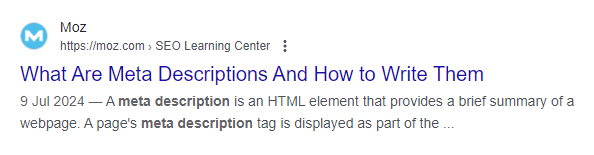
All websites will allow you to write your own for your pages, although the method will be different for each.
Next, make use of the different header options. Most sites will offer Headers 1-5 as standard (usually referred to as H#, e.g. H1), some may have more. These offer two benefits. They tell Google’s search robots how important the different headlines are when deciding to rank your page. H1 means it’s the most important header on the page, and all other headers should be considered as less important, but still more important than the copy that makes up the rest of the page.
You don’t have to use all of them, and the ones you don’t use don’t have to be in order – just remember that the highest number will be the most important.
They also act as a visual cue for your visitors – the biggest headline is the most important, but you’re drawing attention to all the important topics in your article.
Why do you need backlinks?
The rule for backlinks is that higher profile (reputable) sites have better quality links – the fact that they’ve linked to you is seen as a kind of endorsement by Google, and as a result you get improved ranking for your own pages. This works in reverse, too – lots of links from low-quality sites will make your site’s performance worse.
For most sites, it’s a balancing act. There are steps you can take to stop the bad links from being counted, but building your collection of good links can be a challenge. Have a think about any connections you might have that can help, which might be clients, industry connections or accrediting bodies.
The secret to well-written content
This one is much tougher to quantify, but sits across all the other factors. A well-written site will be more appealing to customers and Google’s search robots. It also increases your chances of taking one of the search features that will give your organic search performance a boost by featuring some of your content at the top of the page.
Copywriting is definitely more art than science, so if it’s not your forte then it might be worth looking at outsourcing it. There are also tools that will help with the basics, like Grammarly – it won’t write the copy for you, but it will help make it more readable.
The weapon of last resort here is of course GPT. Catapulting from being virtually unheard of to being the subject of at least 50% of the articles in my news feed at any one time, used the right way, GPT can be incredibly helpful with content creation. The vital thing is to remember that it’s only part of the puzzle – it’s not taken long for people to recognise the distinctive style of content written by GPT, so it should only be part of the process. Use it for research and content ideas, but not to produce anything that’s used without serious finessing from you or your team.
Ask for help if you need it
It’s easy to fall into the trap of trying to do everything yourself, but the fact is, agencies like ours exist because this work is difficult, technically finicky and really intensive. If you’re hitting brick walls everywhere you turn, give us a ring or drop us an email. We can quote for any or all of the work you’re struggling with, and in the long term finding a quicker resolution could well end up saving you money.
If your website isn’t delivering the results you were hoping for or expecting, it’s probably time to look at your search optimisation, sometimes also called your organic search performance (so called because it happens “naturally”, as opposed to paid search results that have a direct cost). In this Blog, we’ll look at what search engine optimisation is, what it does, and the foundational approaches to carrying it out.
What is Search Engine Optimisation (SEO)?
To really understand what SEO is, it’s helpful to know a little bit about how search engines worked before Google, and how they (Google) work now.
Back in the old days, when dinosaurs roamed the web, search engines were dumb. They didn’t know anything about you other than the words you were typing into your search bar, and they used a basic matching system to deliver you search results linked to the words. If you looked for “computer mouse”, you’d get some results about computer mice, some results about mice that eat cheese, and some results about computers but no mention of mice. You could find what you wanted with a bit of work, but the internet was a smaller place generally so there wasn’t a ton of results to wade through for most topics, and it was possible to get your page to the top of a search engine results page (SERP) using tactics as ingenious as including the word you were targeting as many times as possible in the page.
That all changed when Google came along. Google’s search results are affected by so many different factors that it’s not practical to list them all here, but here is a very rough explanation using some of the factors:
- Google’s search robots (bots) analyse (or crawl) every single page on the internet that they can reach
- The data collected by Google’s bots is used to assign every website a “quality” score based on Google’s own criteria
- The technical standard of each website is assessed, including how long a page takes to load
- The bots will also attempt to understand what the page is about in order to decide where it should appear in your search results
- Google hold data on everyone who has a Google account (in 2023 there were 1.8 billion users of Gmail, Google’s email software, worldwide)
- By combining their data on the page and their data on you and your behaviour, Google will then show you the search result it thinks best matches what you were looking for
As I say, this isn’t an exact explanation, but if we apply it to the same search as above, you can see the difference in the results.
If you look for “computer mouse”, Google knows that kind of mouse isn’t related to the animal, because it understands how the words work together to create context. It also knows that when you search for those words you’re looking for the answer to a question, and it wants to guess what your question is and answer you in the most efficient way it can. Your search might include a map which shows the nearest places to your location that sells computer mice, especially if you’re using your mobile phone to search. You might be preferentially served results for a site that sells computer equipment that Google knows you’ve previously visited. You’ll almost certainly get results that are adverts for places near you or online that sell computer equipment. Those are a topic for another day – we’re looking for the results that appear below those, which could include local search results, and features that highlight content from particular sites which answer the question Google thinks you’re asking.
And that’s where SEO comes in. It’s the art of structuring your website, including everything that’s written on it, to have Google understand what it is you do and how you can help its users, so that it can then recommend you to them ahead of your competitors.
How do we know what Google is looking for when ranking a webpage?
Because Google has done such a good job of keeping the algorithm that powers their search a secret, traditionally SEO has been based on observations of the way that pages perform.
That all changed earlier this year, when for the first time, Google’s internal documents were leaked that discussed some of the criteria that decide on the order of their search results.
That’s how we know that every site is given a quality score by Google, which was always suspected by industry experts, but never confirmed. We also know some of the other things that Google’s bots prefer to find when crawling a page.
Google’s stated preference for a site is that it demonstrates the qualities Experience, Expertise, Authoritativeness and Trustworthiness (Which they call E-E-A-T).
Experience means they want you to show that you’ve already done the thing you’re telling people you can do. Expertise is showing that you can do it well, and have good subject knowledge. Authoritativeness would ideally be demonstrated by having good quality links to your site from other sites in the same industry, or high-profile news sites like the BBC or The Guardian. Trustworthiness would look for reviews from Google itself, a third-party review site like Trustpilot, or hosted on your own site. On a more fundamental level, this one also wants your site to have secure hosting that protects the data of your customers.
So, what should you aim for?
- Informative, well-written content. This covers every single letter in the acronym, as it demonstrates why your goods or services are better than the competition (EE), the better your content the more sites will want to link to it (A), and if you’re hosting your own reviews from customers, you’ll want to work with them to make sure that they’re compelling (T).
- Content that’s been structured in a way that makes it easy for both people and Google’s search bots to read and understand it. Luckily, these two aims aren’t mutually exclusive.
- High-quality backlinks. Not much more to add here beyond what’s discussed above, but we’ll discuss the impact of low-quality backlinks later.
Creating quality content
One of the toughest parts of working on search optimisation is that it needs a combination of analytic and creative skills to address poor performance. It’s really easy to say that the solution is quality content, but what that looks like and how you produce it will be unique to everyone. To make it slightly easier, you can use the PARTY acronym:
Plan – Plan your content, not just by laying out the structure of your article, but by using tools like Answerthepublic, Google Trends, and the search suggestions in the Google search bar to look at what people are searching for, so you can answer their questions as part of your writing. It’s also helpful to produce a content plan which covers a longer period. This can be especially useful if you’re able to share the writing responsibilities, as it makes sure you’re all aiming at the same target.
Apply – One of the least sexy bits of search optimisation, and it’s not the sexiest job at the best of times, is the application of the fundamental aspects of optimisation. It’s discussed more below.
Research – As both a user and a search bot, there’s no worse kind of page to land on than one that’s thin on content. If you’re doing some writing and it’s not one of your specialist subjects, you need to do enough research to be informative, and if possible, find something new to add to the conversation.
Tell – Both the public and Google love a lived experience. If you’ve got personal anecdotes which relate to your topic, find a way to work them in there. If you have a house style for writing that doesn’t require you to be formal (which most retail businesses are unlikely to), adding some personality is a great way to make a connection with your reader.
Yield – Maybe this one should have been first, but no one is going to remember an acronym that spells out Ypart. What’s your article intended to do for your site? Do you want to promote a range of products, or demonstrate expertise in a particular area? This gives you the topic for the article, and that lets you know what to aim for with everything else you do.
Using the proper structure
This should go hand-in-hand with creating quality content, so much so that I’ve included it in the PARTY acronym. The key elements are:
Page title – the first thing people and bots see, and the keystone your search is built on. It can often be a good idea to make this a question that you answer in the article, to fit with the questions users are trying to answer via Google.
Headers – structure your paragraphs with compelling headers. Don’t be afraid to use questions here too, if they’re relevant to the topic. Headers use a simple bit of code (H1, H2, H3, etc) to tell Google the order of importance attached to your article headings. It also makes them larger than standard text (paragraph), which is important for your customers too.
Meta description – the precis that Google shows of your page’s topic. This is often a missed opportunity, don’t waste the chance to write something that makes your potential visitors want to learn more. Make the best use of the character limit (although the Google leak has shown that this isn’t all that important, it’s still good practice for the users who’ll be reading just the part that fits).
Build your backlinks
Strengthening your site’s search optimisation can sometimes be a case of who you know, rather than what you know, but with a bit of ingenuity you can create connections that will increase your search ranking and hopefully bring in a few more visitors directly.
High profile sites (news sites like the BBC, expert sites in your field of work, and some educational sites all have good quality authority that will flow through links into your site. Have a think about any connections you might have that could be interested in linking to you. If you don’t have any, that’s fine too, but it might take a bit more legwork to get a decent amount of links sorted out. If you’ve got something newsworthy, you should always include a link to your site from any press release you send out. It often won’t make it to the final draft, but if it does you’ll be getting even more use out of the story.
A quick word on toxic backlinks
So called “toxic” backlinks are ones that have the opposite effect on your site’s ranking. They might be from an attempt to boost a site’s profile in the early days of Google, when the number of links was more important than the quality, or they could have accumulated for an unknown reason. Whichever it is, there is a process to disavow the link via a Google tool if you aren’t in a position to have it removed from the other site (and many will not respond to contact emails), which can go a little way towards alleviating the problem.
Conclusion
This has been a very high-level look at the basics of Search Engine Optimisation. It can be intimidating to tackle without the right tools to measure success and suggest improvements, which is why we’re always ready to help if you need us. We’ve helped companies from a wide variety of industries to improve their site’s visibility, and would love to help you do the same.
If you’re looking to launch an eCommerce website, success starts with making sure you’re using the right platform. Making a choice from the many platforms available can be tough, but we’re here to talk about Shopify, and why it is the platform of choice for so many businesses. One of the chief reasons to choose it when you’re starting out in eCommerce is the very user-friendly content management system it offers.
That’s not all, though, as it has a robust feature suite that can be expanded through the plugin store, and most importantly for growing businesses, scalability. That means you won’t be stuck on a platform that was perfect when starting out, but can’t grow with your business.
However, like any other platform, Shopify has its own set of pros and cons that should be carefully considered before making a decision. In this blog post, we’ll briefly explore the advantages and disadvantages of choosing Shopify over any other eCommerce platform.
You can also visit our Ultimate Guide to Shopify Website Development to find out more about the process of working with an experienced Shopify agency.
Pros of choosing a Shopify website:
- User-Friendly Interface: As mentioned above, one of the biggest advantages of Shopify is its user-friendly interface, making it easy to add your products and build new pages and collections. Getting the store looking exactly the way you want it might need help from an experienced Shopify agency, but once that’s been done you’ll be able to quickly and easily expand the site as needed.
- Robust Features: Shopify offers a wide range of built-in features and functionalities that some other eCommerce site builders count as extras, including inventory management, order processing, payment gateways, and marketing tools. Additionally, Shopify’s App Store provides access to thousands of third-party apps and integrations that can add even more functions to your store.
- Scalability: Whether you’re a small startup or a large enterprise, Shopify can scale with your business. Their clear pricing plans (You’re either a Shopify customer or a Shopify Plus customer, instead of lots of tiers with little difference) and ability to handle high traffic volumes mean the businesses using the platform can grow and expand their online operations without worrying about technical limitations and navigating through lots of increases in costs in order to scale up.
- Mobile Responsiveness: In today’s mobile-centric world, having a mobile-responsive website is a fundamental requirement. Shopify websites are optimised for mobile devices, ensuring a seamless shopping experience for customers across desktop, tablet, and smartphone devices.
- Security and Reliability: Shopify prioritises security and reliability, offering robust security features, SSL encryption, and PCI compliance to protect your customer data and transactions. With 99.99% uptime and automatic backups, you also don’t have to worry about your site being unavailable when your customers want it.
Cons of choosing a Shopify website:
- Transaction Fees: While Shopify offers a range of pricing plans, merchants will incur transaction fees for each sale made through the platform, in addition to credit card processing fees. These fees can add up, especially for businesses with high sales volumes, impacting overall profitability. If you are a growing business and can plan ahead, work out what the potential costs might be over time to see if it will hit your overheads.
- Limited Customisation: While Shopify allows for customisation through themes and apps, without using an agency most businesses will find they can’t make significant changes. That’s not necessarily a complete negative, however, as agency involvement can let you draw on the experience they’ve gained from working on sites for other successful businesses.
- Dependency on Third-Party Apps: While Shopify’s App Store offers a vast selection of third-party apps and integrations, relying too heavily on apps can lead to dependencies and potential issues with compatibility, performance, data management and security. Make sure you’re doing the homework on apps before you trust them, and again, an experienced agency will let you tap into their knowledge.
- Subscription Costs: While Shopify offers a range of pricing plans to accommodate different business needs, Shopify Plus in particular can add a chunk of extra cost onto your business (around £2000 per month at time of writing). Carefully consider your budget and long-term goals when choosing a Shopify plan in order to make sure you can afford that leap when you need it.
- SEO Limitations: While Shopify provides basic SEO features and tools, eCommerce platforms and SEO sometimes mix like oil and water, thanks to the . Optimising product pages, meta tags, and URLs for search engines may require additional effort and customisation, so hire a good professional to help if you can’t do this yourself.
Choosing a Shopify website offers a lot of advantages, including a user-friendly interface, robust feature set, scalability, and security. However, consider the potential drawbacks, such as transaction fees, limited customisation, dependency on third-party apps, subscription costs, and SEO limitations, before committing. Some issues are common across all eCommerce platforms, and others are unique to Shopify.
Ultimately, the choice should factor in your specific business needs, budget, technical requirements, and long-term goals.
We can help you choose
If you’re in the decision-making phase and would like a little expert knowledge, get in touch and we’ll be happy to explain why we think Shopify is, or maybe isn’t, the right platform for you.